What is keyword in Digital Marketing?
A keyword in digital marketing is a word or phrase that users enter into search engines like Google when looking for information, products, or services. For example, when someone searches for “best budget laptops for students,” the entire phrase is considered a keyword.
Keywords help businesses understand what their target audience is searching for and create relevant content to reach potential customers. They play an important role in Search Engine Optimization (SEO) by helping search engines match webpages with relevant search queries. They are also used in Pay-Per-Click (PPC) advertising to help businesses show ads to people searching for specific products or services.
Why Are Keywords Important in SEO?
Modern SEO Uses Keywords to Understand Topics and Search Intent
In traditional SEO, keywords were often treated as exact phrases that users entered into Google. Marketers would identify these phrases through keyword research and then include them in page titles, headings, ad copy, meta descriptions, and website content. The goal was to make it clear to both search engines and users that a page was relevant to a particular search.
However, modern search is no longer based on exact keyword matching alone. Search engines have become much better at understanding the meaning behind a query, the relationship between words, and the intent behind a search. This means that a webpage does not necessarily need to repeat the exact wording of a query to be considered relevant.
For example, someone searching for “running shoes for flat feet” may also find useful results for queries such as “best shoes for people with flat feet” or “supportive running shoes for flat arches.” Although the wording is different, the underlying topic and search intent are closely related.
Search Behavior Is Becoming More Conversational
The way people search has also changed. Instead of relying only on short keyword phrases, users increasingly enter longer, more specific, and conversational queries.
AI-powered search tools have further encouraged this behavior. People can now ask detailed questions in a natural, conversational way rather than trying to reduce their question to a few keywords.
Keywords Still Matter in Modern SEO
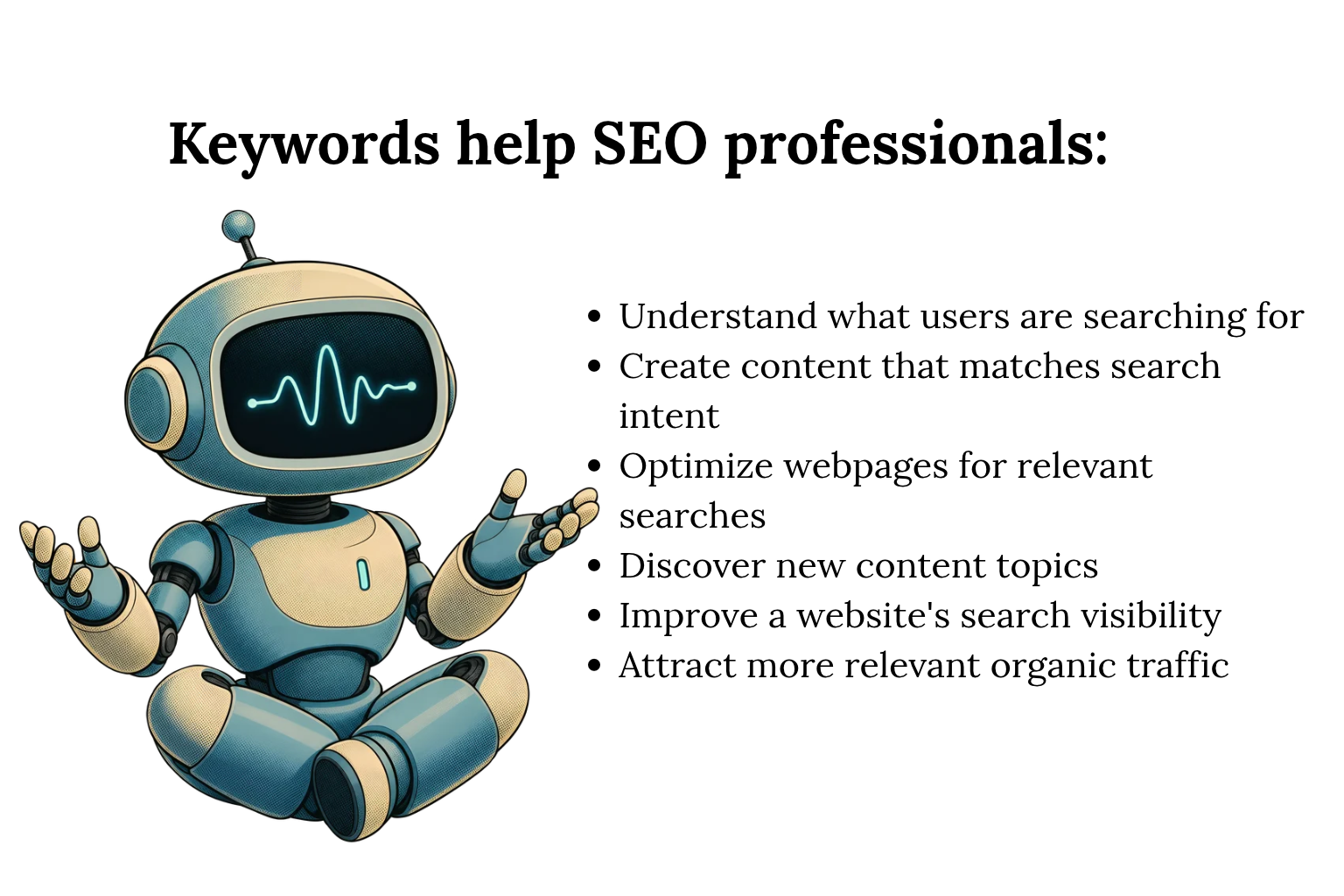
This does not mean keywords are no longer important. Instead, their role has expanded.
A keyword can provide valuable clues about:
- What topic the user is interested in
- What problem they are trying to solve
- What information they need
- What action they may want to take
- How specific their search is
- Which related topics should be covered
For this reason, SEO professionals should look beyond individual keyword variations and identify the broader topic and search intent behind them.
A single page may naturally rank for many related searches even when those phrases are not used word-for-word. Comprehensive content can cover the main topic, related concepts, questions, entities, and subtopics that help search engines understand the page’s relevance.
Keywords remain important signals, but they are now better understood as part of a broader context rather than isolated phrases.
Here’s a more detailed, original version with a clearer SEO-focused structure. I’ve also separated SEO metrics from PPC metrics because CPC, conversion rate, and ROAS are especially relevant to paid search rather than organic rankings.
How Keyword Marketing works?
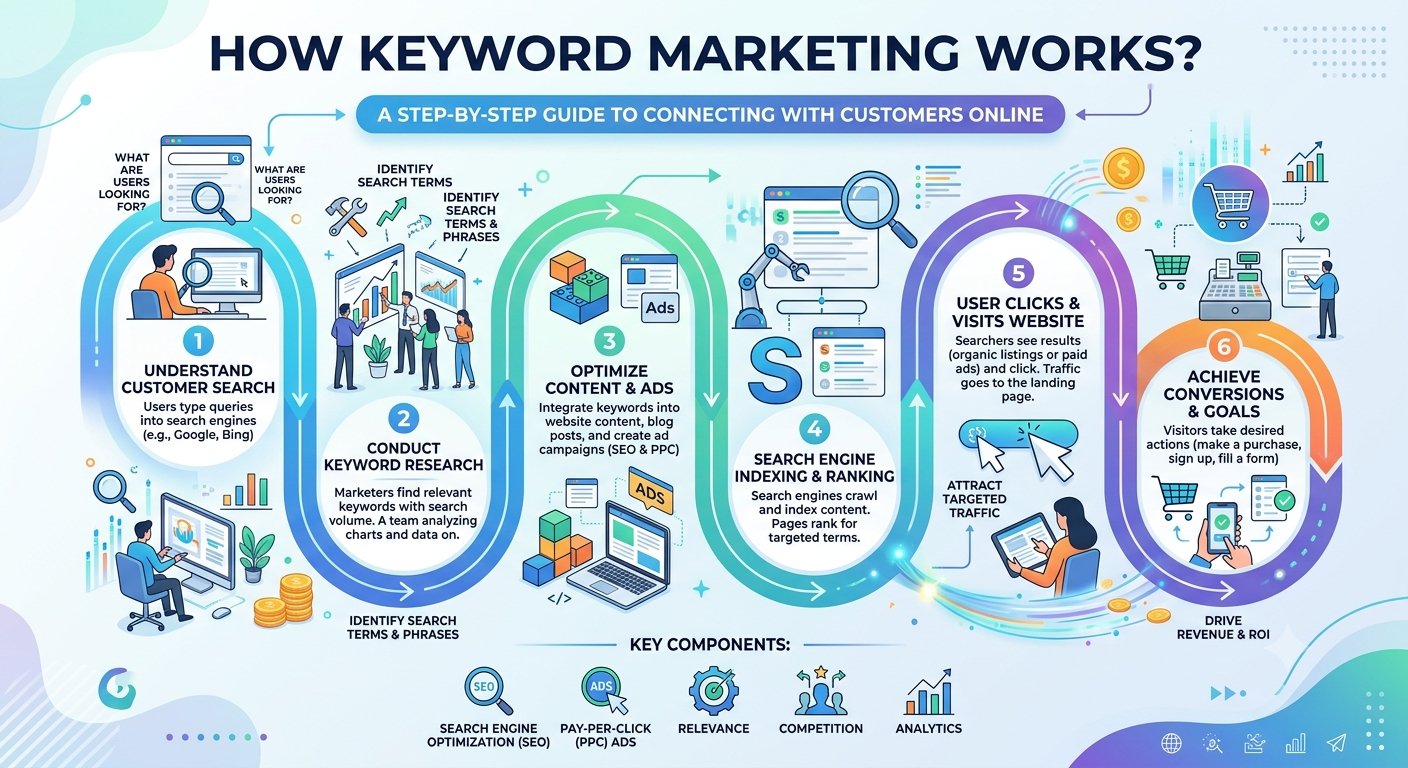
Keyword marketing is a digital marketing strategy that uses relevant search terms to connect businesses with people looking for specific products, services, or information. It helps businesses improve their visibility on search engines, attract targeted traffic, and reach potential customers.
Keyword marketing is commonly used in SEO and PPC advertising. In SEO, businesses use relevant keywords in website content to improve organic search visibility. In PPC campaigns, they target keywords to display paid ads to users searching for related products or services.
Understanding Keyword Metrics
Keyword metrics help SEO and PPC professionals evaluate the potential, competitiveness, and business value of search terms. Rather than choosing keywords based only on how often they are searched, marketers can use multiple metrics to understand whether a keyword is relevant, achievable, and likely to contribute to their goals.
The importance of each metric depends on the campaign. For SEO, metrics such as search volume, keyword difficulty, search intent, and traffic potential can help with keyword selection. For PPC, CPC, conversion rate, and ROAS provide additional insight into advertising costs and business performance.
Here are some of the most useful keyword metrics to consider:
Keyword Search Volume
Search volume refers to the estimated number of times a keyword is searched within a specific period, usually a month.
It provides an indication of how much interest there is in a particular search term. A keyword with high search volume may have the potential to attract more visitors, but high volume does not automatically mean it is the right keyword to target.
For example, a broad keyword such as “digital marketing” may have a much higher search volume than “digital marketing services for small businesses.” However, the second keyword may better match the needs of someone looking for a service.
Search volume should therefore be considered alongside search intent, competition, relevance, and potential business value.
Keyword Difficulty
Keyword Difficulty (KD) is a metric used by many SEO tools to estimate how difficult it may be to rank organically for a particular keyword.
A keyword with high difficulty generally has strong competition from established pages and websites. A lower-difficulty keyword may be easier to target, although the actual difficulty of ranking depends on factors such as content quality, relevance, website authority, backlinks, search intent, and the competing pages.
For example, a newer website may find it more practical to target specific long-tail keywords before competing for highly broad and competitive terms.
Keyword difficulty should be treated as a directional metric rather than a guarantee of ranking difficulty. Different SEO platforms calculate it using their own methodologies.
Cost Per Click (CPC)
Cost Per Click (CPC) represents the amount advertisers pay, or are expected to pay, for a click on a paid search advertisement.
CPC is primarily a PPC metric, but it can also provide useful context during keyword research. Keywords with higher CPCs may indicate that advertisers consider the search term commercially valuable or that competition among advertisers is strong.
For example, a keyword related to a service or product may have a higher CPC than a general informational query because a click could have greater potential business value.
However, CPC should not be used alone to determine whether a keyword is valuable. The keyword’s intent, conversion potential, audience relevance, and overall advertising costs should also be considered.
Conversion Rate
Conversion rate measures the percentage of visitors who complete a desired action after reaching a website or landing page.
Depending on the campaign, a conversion could be:
- Making a purchase
- Submitting a lead form
- Requesting a quote
- Booking an appointment
- Signing up for a newsletter
- Registering for an account
- Downloading a resource
For example, if 100 users visit a landing page and 5 complete the desired action, the conversion rate is 5%.
Conversion rate is particularly important for PPC because generating clicks is not enough. The traffic also needs to produce meaningful business actions.
For SEO, conversion data can help identify which organic keywords and landing pages are attracting visitors who are more likely to become customers.
Return on Ad Spend (ROAS)
Return on Ad Spend (ROAS) measures how much revenue a paid advertising campaign generates compared with the amount spent on advertising.
The basic calculation is:
ROAS = Revenue Generated ÷ Advertising Spend
For example, if a campaign generates ₹50,000 in revenue from ₹10,000 in ad spend:
ROAS = ₹50,000 ÷ ₹10,000 = 5
This means the campaign generated ₹5 in revenue for every ₹1 spent on advertising.
ROAS is particularly useful for ecommerce and other campaigns where revenue can be directly attributed to advertising. However, it does not include every business cost, so a positive ROAS does not necessarily mean the campaign is profitable.
Search Intent
Search intent describes the reason behind a user’s search.
Common types include:
- Informational: The user wants to learn something.
- Navigational: The user is looking for a specific website or destination.
- Commercial: The user is researching options before making a decision.
- Transactional: The user is ready to take an action, such as purchasing a product.
Understanding intent helps determine whether a keyword is suitable for a particular page.
For example, “what is technical SEO” has informational intent, while “technical SEO agency” has stronger commercial intent. Creating the same type of page for both searches may not satisfy users equally well.
Traffic Potential
Traffic potential estimates how much organic traffic a keyword or topic could potentially generate.
Search volume alone does not always represent the traffic opportunity because one page can rank for many related queries. A keyword with moderate search volume may therefore have significant potential if the page can rank for a wider group of relevant searches.
Looking at related queries, SERP results, competing pages, and the broader topic can provide a more realistic view of potential organic traffic.
Organic Click-Through Rate (CTR)
Organic CTR represents the percentage of search impressions that result in clicks to a website.
The basic calculation is:
CTR = Clicks ÷ Impressions × 100
For example, if a page receives 1,000 impressions and 50 clicks, its CTR is 5%.
CTR can help identify pages that are appearing in search results but are not receiving as many clicks as expected. Title tags, meta descriptions, search intent, SERP features, and the position of the result can all influence whether users click.
Ranking Position
Ranking position indicates where a webpage appears in organic search results for a particular query.
Tracking ranking changes can help identify whether a page is gaining or losing visibility. However, ranking position should not be viewed in isolation. A keyword may rank well but generate little business value if it has low relevance or weak conversion potential.
It is more useful to consider rankings alongside impressions, clicks, CTR, conversions, and revenue.
How to Use Keyword Metrics Together
No single keyword metric can determine whether a keyword is worth targeting. A stronger approach is to evaluate several metrics together.
For example, a keyword may have:
- High search volume but extremely strong competition
- Low difficulty but very little search demand
- High CPC but poor relevance to the business
- Strong traffic potential but low conversion intent
- Moderate search volume but highly valuable commercial intent
The right keyword depends on the website, audience, competition, search intent, content strategy, and business objective.
For SEO, marketers can prioritize keywords by looking at relevance, search intent, search demand, difficulty, traffic potential, and the ability to create genuinely useful content.
For PPC, additional metrics such as CPC, conversion rate, cost per conversion, and ROAS can help evaluate advertising efficiency and business outcomes.
How to Find Keywords for SEO
Finding the right keywords is the foundation of an effective SEO strategy. But keyword research is not simply about finding phrases with high search volume.
The best keywords are the ones that connect what your audience searches for, what they want to accomplish, and what your website can genuinely provide.
Here’s a practical process you can use to find and evaluate keywords.
1. Start With Your Customers
One of the best places to find keyword ideas is your existing customers.
Customers often use different language from marketers when describing their problems, needs, and goals. Those conversations can reveal valuable search terms that may not appear in your initial keyword list.
Look at:
- Customer support questions
- Sales conversations
- Reviews and testimonials
- Survey responses
- Live chat messages
- Product feedback
- Frequently asked questions
- Questions received by sales teams
For example, customers might describe a product as “shoes for standing all day” rather than searching for the broader term “comfortable shoes.”
These phrases can help you discover more specific keywords and understand the problems your audience is actually trying to solve.
2. Look at Online Communities
Forums and online communities can provide another source of keyword ideas.
People often discuss their problems, compare products, ask questions, and share experiences using natural language. These conversations can reveal topics that may be difficult to discover through traditional keyword research alone.
Depending on your industry, you can explore:
- Reddit communities
- Facebook groups
- Industry forums
- Discussion boards
- Q&A websites
- Professional communities
- Relevant social media discussions
Pay attention to recurring questions and phrases.
For example, if people repeatedly ask whether a particular type of running shoe is suitable for flat feet, that could lead to content such as:
- Best running shoes for flat feet
- How to choose running shoes for flat feet
- Running shoes for flat feet and beginners
- Do people with flat feet need supportive running shoes?
The goal is not to copy community conversations. Use them to understand the problems, language, and search needs of your audience.
3. Analyze the SERPs
Your search results page can be a valuable keyword research resource.
Enter a broad topic into Google and examine what appears. Pay particular attention to SERP features that reveal related searches and questions.
Useful areas to check include:
- People Also Ask
- Related Searches
- Autocomplete suggestions
- Featured snippets
- Related topics
- Image results
- Video results
- Product results
- Local results
For example, searching for “technical SEO” might reveal related questions about technical SEO audits, crawling, indexing, sitemaps, redirects, and Core Web Vitals.
These suggestions can help you expand your initial keyword list and identify questions worth answering in your content.
4. Use Keyword Research Tools & Start with seed keyword
Once you have some initial ideas, use keyword research tools to expand your list and evaluate potential opportunities.
Start with a seed keyword that broadly describes your topic, product, or service.
For example:
Seed keyword: content marketing
Potential keyword ideas might include:
- Content marketing strategy
- Content marketing examples
- B2B content marketing
- Content marketing for small businesses
- How to create a content marketing strategy
Keyword research tools can provide additional data, including:
- Search volume
- Keyword difficulty
- Search intent
- CPC
- Keyword variations
- Related questions
- Trends
- Competitive information
Use these metrics to narrow your list rather than choosing keywords based solely on search volume.
5. Understand Search Intent
Before targeting a keyword, determine what the searcher is actually trying to accomplish.
Search intent generally falls into four categories:
Informational intent, Navigational intent, Commercial intent, Transactional intent, In the previous section we discuss briefly. Understanding intent helps you choose the right keywords for the right pages.
6. Find Long-Tail Keywords
Don’t focus only on broad, high-volume keywords.
Long-tail keywords are more specific search queries that usually contain several words and represent a narrower search need.
For example:
Broad:
running shoes
More specific:
running shoes for beginners
Long-tail:
best running shoes for beginners with flat feet
Long-tail keywords can be valuable because they often provide more context about what the searcher wants.
They can also help you discover specific questions and subtopics to cover within a broader piece of content.
7. Analyze Your Competitors
Competitor research can reveal keywords and topics your website may be missing.
Identify pages that currently appear for the keywords you want to target and examine:
- Topics they cover
- Search intent they address
- Content format
- Subtopics included
- Questions they answer
- Internal links
- SERP features they appear in
- Areas where the content may be incomplete
The goal is not to copy competing pages. Instead, use competitor research to understand the current search landscape and identify opportunities to create something more useful, clearer, more complete, or better aligned with the user’s needs.
8. Group Keywords by Topic
After collecting your keyword ideas, organize closely related terms into logical groups.
For example:
Main topic: Technical SEO
Related keywords:
- Technical SEO
- Technical SEO basics
- What is technical SEO?
- Technical SEO checklist
- Technical SEO audit
- Technical SEO best practices
Instead of automatically creating a separate page for every variation, determine whether the keywords share the same search intent.
Grouping related keywords helps you build topic-focused content and can make your content strategy easier to manage.
9. Prioritize Your Keywords
You may end up with hundreds or thousands of keyword ideas. You don’t need to target all of them.
Prioritize keywords based on factors such as:
| Factor | What to Consider |
| Relevance | Does the keyword closely relate to your website, product, or service? |
| Search intent | Does the intent match the page you want to create? |
| Search volume | Is there meaningful search demand? |
| Difficulty | How competitive does the SERP appear? |
| Business value | Could the keyword attract a valuable audience? |
| Traffic potential | Could the page rank for related searches as well? |
| Content opportunity | Can you create genuinely useful content around it? |
This helps you focus your SEO efforts on keywords that have a realistic connection to both user needs and business goals.
10. Build a Keyword List You Can Actually Use
Once you’ve researched and prioritized your keywords, turn them into an actionable content plan.
For each keyword or keyword group, identify:
- Primary keyword
- Secondary or related keywords
- Search intent
- Target page
- Content type
- Priority
- Existing ranking URL, if applicable
- Content creation or optimization requirement
How to Use Keywords in web Content?
Finding the right keywords is only the first part of keyword optimization. The next step is using those keywords in a way that helps search engines understand topic while keeping the content natural and useful for readers.
Keyword placement can also support visibility across newer search experiences, including AI-generated answers. However, traditional search optimization and AI search optimization are not identical.
The best approach is to create clear, well-structured, useful content and use relevant keywords naturally throughout the page.
Using Keywords to Optimize for Traditional Search
Keywords can help search engines understand the topic and relevance of a webpage. Rather than placing keywords wherever possible, use your primary and related terms in areas where they naturally describe the content.
Here are some important places to consider.
Add the Primary Keyword to the Title and H1
Page title tag and H1 heading should clearly communicate what the page is about.
For example, if the primary keyword is “technical SEO checklist,” a title could be:
Technical SEO Checklist: 15 Things to Check
The H1 can use a similar or slightly different variation:
Technical SEO Checklist for Better Website Performance
The keyword does not need to be repeated word-for-word in every element. The priority is to make the page topic clear to both users and search engines.
Keep the URL Relevant and Concise
A short, descriptive URL can help communicate the subject of a page.
For example:
example.com/technical-seo-checklist/
is clearer than:
example.com/blog/article123?id=4587
Include the main topic in the URL when it makes sense, but avoid adding unnecessary keywords or creating excessively long URLs.
Introduce the Topic Early
Make the subject of the page clear near the beginning of the content.
If your page targets “technical SEO checklist,” the introduction could naturally explain what a technical SEO checklist is and what the reader will learn from the guide.
You do not need to force the exact keyword into the first sentence or a specific number of times. Instead, establish the topic early and make the introduction useful.
Use Related Keywords and Variations Naturally
Avoid repeating the same keyword throughout the page simply to increase keyword frequency.
Modern search systems can understand relationships between words, concepts, and topics. Use relevant variations and terminology where they make sense.
For example, a page about technical SEO may naturally discuss:
- Crawlability
- Indexing
- XML sitemaps
- Robots.txt
- Canonical URLs
- Structured data
- Page experience
- Core Web Vitals
- Redirects
These related concepts help build a more complete explanation of the topic.
Include Keywords in Relevant Subheadings
H2 and H3 headings can help organize your content and make individual sections easier to understand.
Optimize Images With Descriptive Alt Text
Alt text describes an image for users who cannot see it and helps accessibility tools understand the image.
When an image contains meaningful information, write concise alt text that accurately describes what is shown.
Do not use alt text as a place to insert keywords repeatedly. The description should primarily reflect the actual image.
Use Keywords in Internal Links Where Appropriate
Internal links connect related pages on your website and help users discover additional information.
The anchor text should clearly describe the page being linked to.
For example:
Learn more about technical SEO audits
is more descriptive than:
Click here
Relevant internal linking can also help search engines understand relationships between pages and topics across your website.
Using Keywords for AI Search
AI-powered search experiences can change how users discover information. Instead of only scanning a list of traditional search results, users may receive a generated response that combines information from multiple sources.
This makes clear structure, focused sections, direct answers, and strong topical coverage increasingly useful.
However, there is no universal keyword-placement formula that guarantees inclusion in an AI-generated answer.
Here are practical ways to make content easier for AI-powered search systems to understand and use.
Start Sections With Clear Answers
When a section answers a specific question, address that question directly near the beginning.
For example:
What Is Keyword Difficulty?
Start with a straightforward explanation:
Keyword difficulty is a metric used to estimate how competitive it may be to rank for a particular search term.
This structure makes the purpose of the section immediately clear to both readers and automated systems.
Turn Relevant Questions Into Headings
Question-based headings can work well when they match the questions your audience actually asks.
For example:
- What is keyword difficulty?
- How does keyword difficulty work?
- How do you find long-tail keywords?
- What is search intent?
- How do you choose keywords for a new website?
The heading identifies the question, while the opening paragraph provides the answer.
Don’t turn every heading into a question. Use the format when it improves clarity and matches genuine search behavior.
Define Important Terms Clearly
When introducing an important concept, define it directly instead of relying on vague references.
For example:
Keyword clustering is the process of grouping closely related keywords based on their topic and search intent.
This is clearer than beginning with:
It is a process used to organize them.
Clear definitions make the content easier for readers and systems to interpret.
Use Specific Entities and Terminology
When discussing a specific company, product, technology, organization, or concept, use its actual name when relevant.
For example, instead of repeatedly saying “the tool,” identify the tool when the specific name matters to the explanation.
At the same time, avoid unnecessary repetition. Entity clarity is useful, but natural writing should remain the priority.
Keep Related Information Together
Organize related information within the same section whenever possible.
For example, if you are explaining keyword difficulty, keep its definition, influencing factors, interpretation, and practical use together rather than scattering them across unrelated parts of the article.
This creates a clearer content structure and makes individual sections more useful as standalone answers.
Make Each Section Useful on Its Own
A well-structured article should not require readers to search through several unrelated sections to understand a basic concept.
Each major section should ideally:
- Introduce the topic
- Answer the main question
- Provide relevant context
- Give an example when useful
- Connect naturally to the next topic
This structure improves readability while also making individual passages more understandable in different search experiences.
How Traditional SEO and AI Search Work Together
Don’t to create completely separate content for traditional search and AI-powered search.
For example, a well-optimized page about keyword research could use the primary topic in its title and main heading, cover related concepts such as search volume and keyword difficulty, answer common questions, use descriptive subheadings, and provide practical examples.
That same structure can make the content easier for users and search systems to understand across different search experiences.
A Practical Keyword Placement Checklist
Before publishing a page, check whether you have:
- Used a clear primary topic in the title
- Created a descriptive H1
- Written a concise and relevant URL
- Introduced the topic naturally near the beginning
- Used related terms and concepts throughout the content
- Added relevant keywords to appropriate H2s and H3s
- Written descriptive image alt text where needed
- Added relevant internal links
- Answered important questions directly
- Grouped related information logically
- Avoided unnecessary keyword repetition
- Written for the reader rather than a keyword-density target
Effective keyword optimization is not about inserting the same phrase as many times as possible. It is about making the topic, purpose, and relevance of your content clear.
Use primary keywords where they naturally belong, expand the topic with related concepts, organize information into clear sections, and answer users’ questions directly.
This approach supports traditional organic search while also creating content that is easier to understand across modern search and AI-powered discovery experiences.
What Is Keyword Gap Analysis in SEO?
Keyword gap analysis is an SEO process that helps website owners find keywords their competitors are ranking for but their own website is not targeting or ranking well for.
It involves comparing the keywords of your website with those of your competitors to find new opportunities to improve search rankings and attract more organic traffic.
For example, suppose your website ranks for 50 SEO-related keywords, while a competitor ranks for 100. After comparing both websites, you may find that the competitor ranks for 30 keywords that your website does not target. These keywords can help you identify new topics to cover or existing pages that need improvement.
Keyword gap analysis is useful for both SEO and PPC campaigns. In SEO, it helps find content and ranking opportunities. In PPC, it helps identify relevant keywords that competitors may be using to attract paid search traffic.
Main Types of Keywords in a Keyword Gap Analysis
A keyword gap analysis helps identify different types of keywords by comparing your website’s performance with your competitors.
- Missing Keywords: These are keywords for which your competitors appear in Google search results, but your website does not rank. They can help you discover new topics and create content that your audience is searching for.
- Weak Keywords: These are keywords for which your website ranks lower than your competitors. For example, if your website appears in position 15 while a competitor appears in position 5, you may have an opportunity to improve your existing content and ranking.
- Untapped or Unique Keywords: These are valuable keywords that bring traffic to one or more competitors but are not covered by your website. They can help you discover new content ideas and reach a wider audience.
- Shared or Common Keywords: These are keywords for which both your website and competitors rank in Google. Comparing these keywords helps you understand which website has better rankings and where your content needs improvement.
How to Perform a Keyword Gap Analysis
A keyword gap analysis involves comparing your website with competitors, finding missing keywords, and using those opportunities to improve your SEO strategy.
Identify Your Competitors
Start by finding two or three websites that compete with your website in Google search results. Choose competitors that cover similar topics, target the same audience, and offer similar information or services.
For example, if you have an SEO blog, choose other websites that regularly publish SEO guides, keyword research articles, and digital marketing content.
Avoid selecting only large websites with completely different audiences. Smaller websites with similar content can provide more useful keyword opportunities.
Enter Your Website and Competitors’ Domains into an SEO Tool
After identifying your competitors, enter your website’s domain and their domains into a keyword research tool.
Tools such as Semrush Keyword Gap, SE Ranking, and Mangools KWFinder can help compare keyword rankings and identify terms that competitors rank for.
These tools show which keywords your website and competitors are ranking for, along with useful information such as search volume, keyword difficulty, and ranking positions.
This comparison helps you understand which keywords your competitors are targeting and where your website has opportunities to improve.
Find Missing and Weak Keywords
Once the comparison is complete, review the keyword results and focus on missing and weak keywords.
Missing keywords show topics that your competitors cover but your website does not target. These keywords can help you find new blog topics, landing page ideas, and content opportunities.
Weak keywords show where your website ranks lower than competitors. Instead of creating a new article for every keyword, check whether an existing page already covers the topic. If it does, improve that page with more useful information, relevant examples, and better keyword coverage.
You should also check the search volume and keyword difficulty to understand whether a keyword is worth targeting.
Check Search Intent and Group Related Keywords
Before targeting any keyword, understand what people expect to find when they search for it.
For example, someone searching for “what is keyword research” usually wants a detailed explanation, while someone searching for “best keyword research tools” may want to compare different tools before choosing one.
Group keywords with similar meanings and search intent into relevant topic groups. This helps you decide which keywords should be covered together in one article and which need separate pages.
You can organize related keywords into topic clusters to create a clear content structure and connect relevant articles through internal links.
Choose the Most Valuable Keywords
Not every missing keyword is worth targeting. Select keywords based on their relevance to your website, search volume, keyword difficulty, search intent, and potential to attract the right audience.
For example, a keyword with moderate search volume and lower competition may be a better opportunity for a smaller website than a highly competitive keyword with thousands of monthly searches.
Also consider whether the keyword can bring visitors who are interested in your content, products, or services.
The goal is not simply to target more keywords. It is to find relevant search terms that can help your website attract useful organic traffic.
Create New Content or Improve Existing Pages
After selecting the keywords, decide whether to create new content or update existing pages.
If a keyword covers a topic that your website has not discussed, create a new article or landing page that answers the searcher’s needs.
If an existing page already covers the topic but ranks lower than competitors, improve its content instead of publishing another article on the same subject.
Add missing information, explain important concepts clearly, include relevant examples, improve headings, and link to related pages where useful.
Regularly review your keyword rankings to understand whether these improvements are helping your website gain better visibility in search results.
FAQS
What Is Keyword Marketing?
Keyword marketing is the process of choosing and using relevant search terms in website content and online ads to reach people searching for related information, products, or services. It helps businesses improve search visibility, attract relevant visitors, and reach potential customers through both organic search results and paid ads.
What are keywords in Content Marketing?
Keywords in content marketing are the words and phrases people type into search engines to find information, products, or services. They help content creators understand what their audience is searching for and create useful content that matches users’ needs.
Main Types of Keywords: Short-tail keywords are broad search terms, while long-tail keywords are more specific phrases. Informational keywords help users find answers, transactional keywords show an intention to buy, and local keywords target searches related to a particular location.
How Do You Create SEO Keywords?
Creating keywords for SEO means finding the exact words and phrases your target audience types into search engines when looking for information, products, or services. Follow these steps to build a relevant keyword list:
1. Start with Seed Keywords: Identify broad topics related to your website, business, or audience. These are your seed keywords. For example, a digital marketing website might use “SEO,” “email marketing,” and “content marketing.”
2. Use Keyword Research Tools: Enter your seed keywords into tools such as Semrush Keyword Magic Tool, SE Ranking Keyword Generator, or Ahrefs Free Keyword Generator. These tools help you discover related keywords, variations, and questions people search for. Include long-tail keywords, which are more specific phrases, such as “how to do SEO for beginners.” They may have less competition and attract more relevant visitors.
3. Analyze SEO Metrics: Check three important factors before selecting keywords:
- Search Volume: The estimated number of searches a keyword receives each month.
- Keyword Difficulty (KD): An estimate of how difficult it may be to rank for a keyword. New websites can start by targeting relevant, lower-difficulty keywords, but no single difficulty score guarantees success.
- Search Intent: Understand whether users want information, want to compare options, or are ready to purchase. Choose keywords that match the purpose of your page.
4. Analyze Competitors: Search your seed keywords on Google and examine the top-ranking pages. You can also use SEO tools to identify competitors’ ranking keywords and discover content gaps that your website can address.
5. Place Keywords Strategically: Select one primary keyword for each page and support it with relevant secondary keywords. Use them naturally in the page title, H1 heading, introduction, relevant H2 and H3 headings, URL slug, and meta description where appropriate. Add descriptive image alt text when it accurately describes the image. Avoid keyword stuffing and prioritize helpful, readable content.
By following these steps, you can create a keyword list that aligns with your audience’s search needs and supports your SEO strategy. For additional guidance, refer to Google’s SEO Starter Guide.
What Is a Keyword and What Are Its Types?
A keyword is a word or phrase that people enter into search engines like Google to find information, products, or services. In SEO, keywords help search engines understand the topic of a webpage and help website owners create content that matches users’ search needs.
For example, if someone searches for “best SEO tools,” that phrase is a keyword.
What Are the Types of Keywords in SEO?
SEO keywords are classified by length, search intent, and purpose.
- Short-Tail Keywords: Broad terms with high search volume and competition. Example: SEO.
- Long-Tail Keywords: Specific phrases that may have lower competition. Example: SEO tips for beginners.
- Informational Keywords: Used to find information. Example: What is SEO?
- Navigational Keywords: Used to find a specific website. Example: Semrush login.
- Commercial Keywords: Used to compare products or services. Example: Best SEO tools.
- Transactional Keywords: Used when users intend to take action. Example: Buy SEO software.
- Branded Keywords: Include a brand name. Example: Ahrefs SEO tools.
- Non-Branded Keywords: Focus on general topics without a brand name. Example: Free keyword research tools.
- Local Keywords: Target a specific location. Example: SEO agency in Delhi.
Why Are Keywords Important in SEO?
Keywords help website owners understand their audience, choose relevant topics, match search intent, and organize content. Selecting appropriate keywords can improve a webpage’s chances of appearing in relevant search results, although rankings also depend on content quality, competition, technical SEO, and other factors.